Home services and contractors
Stop losing good leads.
Turn more calls, messages and estimates into booked jobs. We set up the follow-up your team doesn't have time for, connected to the tools you already use.
- 14 Missed calls after hoursEach one got a text back within 2 minutes
- 9 Inspections bookedBooked only after the calendar confirmed
- 6 Open estimates followed upReminder sent on day 3, task on day 7
- 3 Handed to the officePrice questions and one out-of-area job
Numbers are made up for illustration
The problem
Where jobs slip away
When follow-up can't keep up with demand, leads go cold. The leaks are usually in the same three places.
Missed calls
The phone rings while the crew is on a roof. The caller tries the next company on the list.
Slow replies
A web inquiry sits until the evening. By then the homeowner has booked someone else.
Forgotten estimates
The estimate went out and the follow-up didn't happen. The job went quiet.
Missed-lead calculator
What do missed inquiries cost you?
Use your own numbers. Rough guesses are fine. Nothing leaves this page unless you add it to your Growth Snapshot.
Fill in all four to see your result.
Inquiries means calls, texts and web forms. Assumes missed ones would book at the same rate as the ones you answer. A month is counted as 4.3 weeks.
For context: CallRail's analysis of 1.1M leads found home services businesses missed 14% of calls (Jan 2025).
Lead-to-Job
Capture, convert, then improve
Three parts that build on each other. Most shops start with the first two and add reporting once there is data.
- Step 1
Capture
- Collect inquiries from your web form, email and CRM in one place
- Remove duplicates and pull out contact details and the job
- Check the address against your service area
- Send anything unusual to our team
- Step 2
Convert
- Send prompt follow-up to people who gave permission
- Remind customers about open estimates
- Check real calendar availability before offering times
- Book only after the calendar confirms, and update the CRM
- Step 3
Improve
- See lead source, response time and booked-job rate
- Track estimate-to-job conversion by service
- Map where your inquiries and best jobs come from
Demo
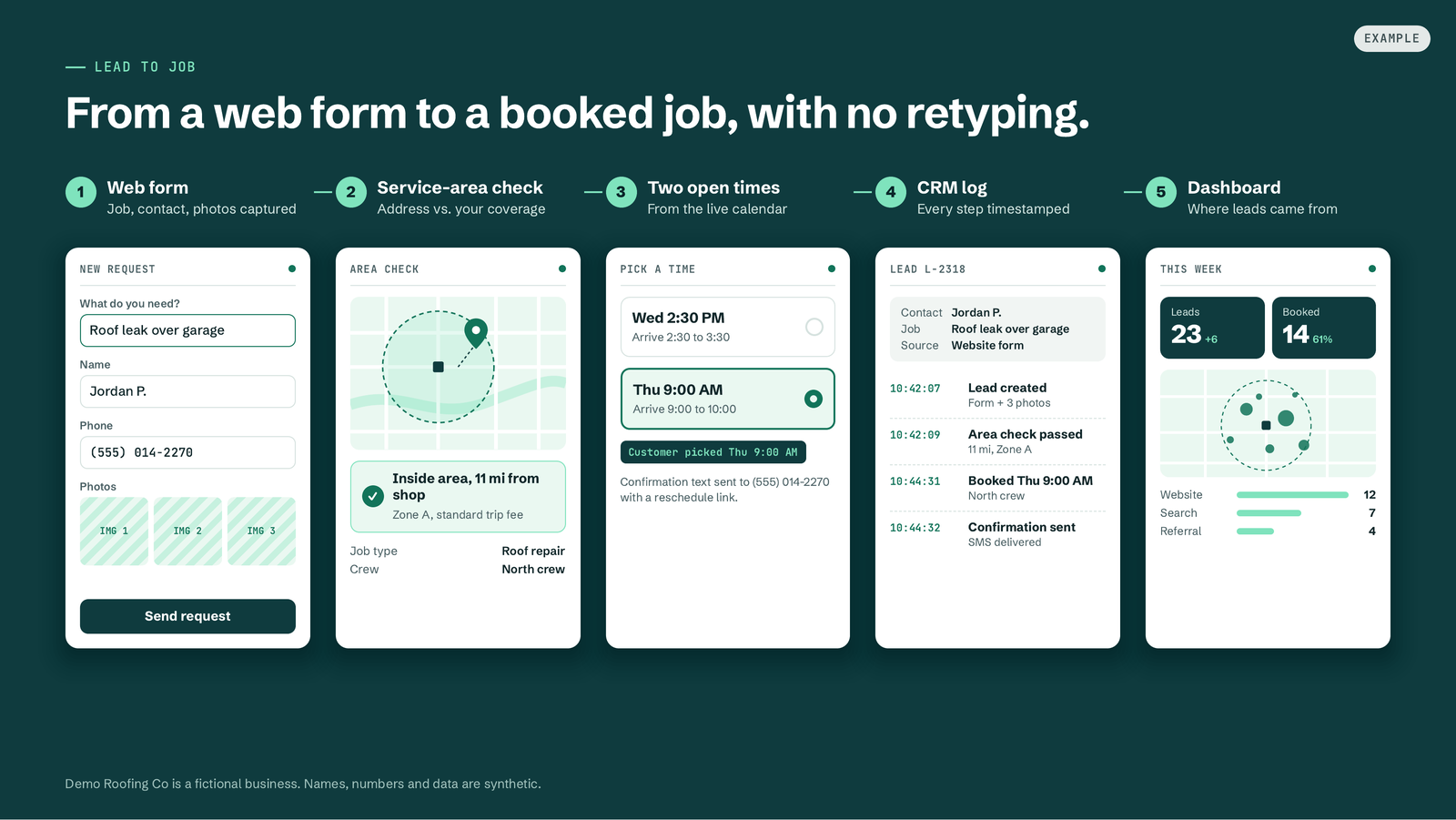
A roofing lead, start to finish
Every name, address and number in this walkthrough is made up. The steps are the ones we set up for real shops.
- 01
A roofing lead comes in
Homeowner reports a leak through the web form while the crew is out.
- 02
Service-area check
The address is checked against the shop's area. Out-of-area leads get a polite reply.
- 03
Booking or callback
Two real open times are offered. If the calendar can't confirm, a callback task is created.
- 04
CRM log
The contact, the job and every message land in the CRM with a timestamp.
- 05
Dashboard and map
Response time, booked jobs and a map of where leads came from.
 Demo company data
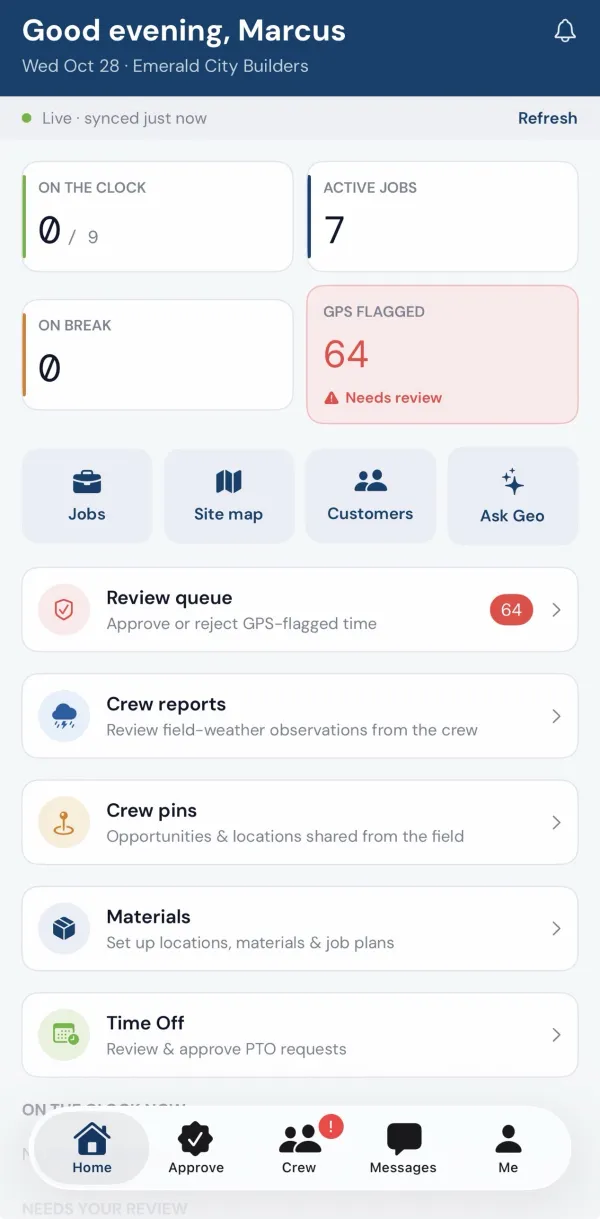
Running crews too? Meet Geowork.
Geowork is our field operations app for crews. It is optional. You can use Lead-to-Job with any CRM.
- GPS-verified crew time
- Quotes customers approve from a text
- Job costing from real hours
FAQ
Common questions
Will this work with my CRM?
Usually. We check your CRM and calendar access during the Snapshot, before any work starts. If a direct connection isn't possible, we'll tell you and suggest a workaround such as task emails or a shared sheet.
Do I need new software?
No. We start from the phone, web form, CRM and calendar you already use. Geowork is optional and only matters if you also want crew time, quotes and job costing.
What if the AI is unsure?
It hands the conversation to our team, with the details attached, and tells the customer someone will follow up. It doesn't guess at prices or book a time your calendar hasn't confirmed.
How do consent and opt-out work?
Automated texts and follow-ups go only to people who gave permission, every message includes a way to opt out, and opt-outs are honored and logged. We set this up with you during the pilot.
How long is a pilot?
A pilot covers one workflow with one tool and agreed success measures. We agree the length with you after the Snapshot, and it ends with a written readout so you can decide what happens next.
What do you need from me?
Access to the tools involved, a short call to walk through how inquiries reach you today, and someone who can answer questions about pricing and scheduling rules.
Free Growth Snapshot
Find out where your leads are slipping.
Answer five questions about how inquiries reach you today. We look at it and send back a short, written Snapshot.
- The one bottleneck we'd fix first
- What data we'd want to see
- A suggested pilot, if one makes sense
Thanks. We have your details.
Someone on the GKTech team reads every request. You will hear from us within 1 business day.
- 01We read it
Your answers go to the team, along with which page you came from.
- 02We reply within 1 business day
By email, with a first take or a couple of questions.
- 03Optional 20-minute call
If it looks like a fit, we set up a short call. No obligation.
Example screens use fictional businesses and demo data.