Job IntakeElevators and lifts
First estimate in minutes for elevator and lift jobs
Home elevators, stairlifts, platform lifts and commercial elevators. Customers answer a few questions on your website, day or night, and anyone stuck inside is told to call right away. You get a job report by email.


On your website
What your customer sees
A homeowner taps "Get a free estimate" and the chat opens. It asks one question at a time and takes photos straight from the phone camera.
- Chat: Hi! I'm the automated intake assistant for Chiwawa Aquila Elevator. I'll ask a few quick questions so the team has everything they need, then they'll get back to you. What do you need done?
- Customer: Our condo building elevator has been stopping a few inches below the lobby floor.
- Chat: Got it. What's the ZIP code where the elevator is?
- Customer: 98101
- Chat: Thanks. When was it last inspected, and is the operating certificate current? Mention any inspection notice with a deadline.
- Customer: Inspected in March. The certificate is posted in the car and it is current.
- Chat: That helps. If you can, add a photo of the car stopped at the lobby showing the gap, and one of the certificate. You can add up to 5.
Elevators and lifts questions
The questions it asks for elevator and lift jobs
Each trade gets its own question set. These are the ones for elevator and lift work.
- 01
What they need
A repair, an inspection, a new home elevator or stairlift, a platform lift or an upgrade
- 02
Building type
A single-family home, a condo or apartment building, or a business
- 03
Lift type and brand
Home elevator, stairlift, wheelchair or platform lift, or a commercial elevator
- 04
What it is doing
Stopped, an error on the display, noises, doors, or stopping uneven with the floor
- 05
Inspection status
When it was last inspected, whether the certificate is current, and any notice deadline
- 06
Timing
How soon they need someone to come out
- 07
Photos from the landing
The display, the brand plate and the doors, taken without going into the pit or shaft
- 08
ZIP code
Checked against your service area before anything else
Photos
Photos it asks for
The chat asks for each photo by name, with a short tip. Customers can add up to 5.
-
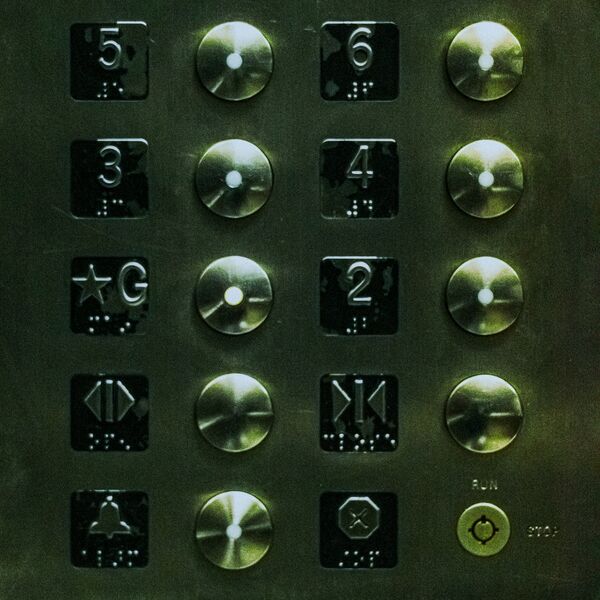
The display or control panel
Any message or error code it shows
-

The call buttons and landing
From the hallway, with the floor number in view
-
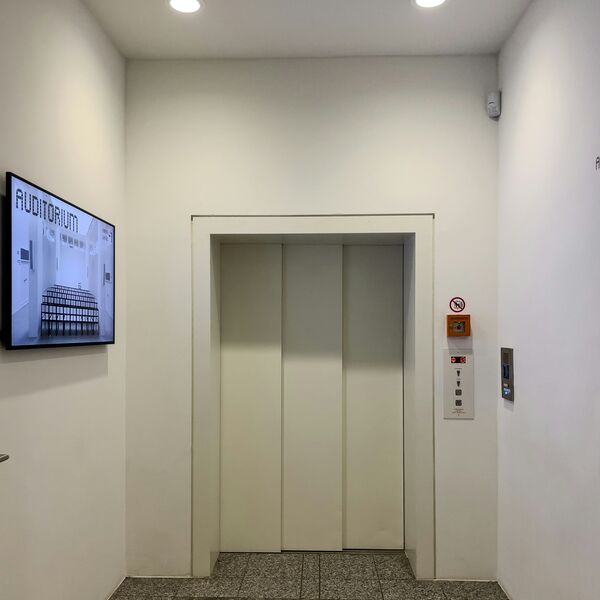
The doors
Closed, and where they stop if they don’t close
-
The stairlift rail or the brand plate
From the stairs or the landing, with every panel left closed


The job report
What you get
A job report by email for every request, with the answers, the photos and a suggested range from your price list. The customer sees no price until you approve it.
Condo elevator stopping a few inches below the lobby floor
Urgency: Soon- Customer
- Taylor Brooks
- Phone
- (555) 010-0116
- [email protected]
- ZIP
- 98101
Needs a site visit
Matched: Repair (not working, noise, doors, error) Approve and send to customer The customer sees nothing until you approve.-
Urgency up top
The job in one line, marked Planned or Emergency.
Condo elevator stopping a few inches below the lobby floor
Urgency: Soon -
Questions to ask on the call
Based on what the customer said and what is still missing.
Ask on the call
- How many stops, and does it happen at every floor or only the lobby?
- Hydraulic or traction, and who services it now?
- Has anyone tripped at the gap?
- Who can meet the technician and open the machine room?
-
What the photos can't confirm
So you know what to check when you see the job.
What the photos can't confirm
- Valve and leveling settings in the controller
- Hydraulic fluid level or leaks
- Condition of the door equipment
Urgent calls
Urgent calls
When a homeowner types words like these, the chat stops asking questions and points them to you right away.
- stuck inside
- trapped
- doors won't open
- dropped suddenly
- moved with the doors open
- smoke
- water in the pit
Shows the call card
A call button with your number, and a line to call 911 if anyone is in danger.
Alerts you
An email marked Possible emergency, with the customer's number when they gave it.
- Chat: Hi! I'm the automated intake assistant for Chiwawa Aquila Elevator. I'll ask a few quick questions so the team has everything they need, then they'll get back to you. What do you need done?
- Customer: My dad is stuck in our home elevator between floors.
Please call the team
This could be urgent. If anyone is in danger, or you see fire or smoke or smell gas, call 911 now. If someone is stuck inside, call 911 or the elevator's emergency line, stay in the car, and don't try to climb out or force the doors. Otherwise please call Chiwawa Aquila Elevator right away at (555) 010-0144.
Call (555) 010-0144Chiwawa Aquila Elevator: possible emergency
Possible emergency
Harper Nguyen reported a person stuck in a home elevator between floors at 4:10 PM.
They were told to call you at (555) 010-0144. Their number is (555) 010-0115.
Call Harper Nguyen Open the job report Powered by GKTech SolutionsBy the numbers
By the numbers
-
4,600
Injuries linked to residential elevators from 1981 through 2019, along with 22 deaths.
-
4 inches
Deepest gap CPSC says installers should allow between a home elevator’s car door and the hallway door.
-
24,700
Elevator and escalator installer and repairer jobs in the US in 2025.
Source: U.S. BLS, Occupational Outlook Handbook: Elevator and Escalator Installers and Repairers
FAQ
Questions owners ask
Something else on your mind? Ask us when you try the demo.
Will it work with my website?
Most likely. Job Intake is added to your site as a short script tag or a "Get a free estimate" button, and the chat opens on top of your page. If your website lets you add a snippet of code, it can run there. If you are not sure, we check it with you.
Who sees the price?
You do, first. The job report suggests a range from your own price list. The customer sees a price only after you tap Approve and send.
What if it's an emergency?
When a customer types words like stuck inside, trapped or doors won't open, the chat stops asking questions and shows a card with your phone number and a line to call 911 or the elevator's emergency line, stay in the car and not climb out. You get an email marked Possible emergency, with their number when they gave it.
What does setup take?
We set it up with you: your service area, the questions for your trade, your price list and the inbox for job reports. On your website it is one script tag or button.
What happens to customer data?
Each business's requests are stored separately, and the details go only to that business. Photos are kept in private storage, and the link in each job report is signed and expires.
Live demo
Try it as a customer
Play the homeowner. The job report goes to your inbox, the way your customers' requests would reach you.
- 01Tell us where to send the report
- 02Answer as a homeowner on an example business site
- 03Open the job report in your email
Demo running
You're the homeowner now
Answer the way your customers would. When you send the request, the job report goes to your inbox.
- 01Describe a job, for example a stairlift quote or an elevator that stops between floors
- 02Add a photo or two from your phone
- 03Send it, then check your email
The demo is open
Check your inbox.
The job report for this demo is on its way to .
The request isn't sent yet.
The job report goes to after you tap Send to the team at the end of the chat.
You've run a few demos today. Come back tomorrow, or book a call and we'll walk you through it.
Example screens use fictional businesses and demo data.